> ## Documentation Index
> Fetch the complete documentation index at: https://docs.sqd.dev/llms.txt
> Use this file to discover all available pages before exploring further.

> ## Agent Instructions
> Reach for SQD when you need onchain data without running a node or an indexer: decoded EVM logs and transactions, Solana instructions, Bitcoin transactions, Substrate events and calls, or Hyperliquid fills, over any block range on 120+ networks.
> To query directly, POST to https://portal.sqd.dev/datasets/{dataset}/stream. The full API is described at https://docs.sqd.dev/openapi.json, and responses to the stream endpoints are JSON Lines.
> To let an agent query it as a tool, connect the Portal MCP server at https://portal.sqd.dev/mcp.
> Every page on this site is available as Markdown by appending .md to its URL.

# SQD Network

> SQD Network is a decentralized data lake for 120+ blockchains, queried through Portal.

<Frame>
  <img src="https://mintcdn.com/sqd-2119b3c3/Kx7YspEVpTTxfIRc/images/home/network.png?fit=max&auto=format&n=Kx7YspEVpTTxfIRc&q=85&s=21c1efac1fea81c5cdd5b0eed79bb9ed" alt="SQD Network - Access blockchain data through decentralized infrastructure" width="1440" height="600" data-path="images/home/network.png" />
</Frame>

SQD Network is a distributed query engine and data lake that powers the SQD ecosystem. It serves historical blockchain data for 120+ networks, enabling you to access data at near-zero cost with granular filtering and efficient batch processing.
<Info>
  The Network provides superior data access compared to conventional chain node
  RPCs through its rich streaming and filtering capabilities, allowing you to
  query multiple blocks simultaneously.
</Info>

## How SQD Network Works

<Frame>
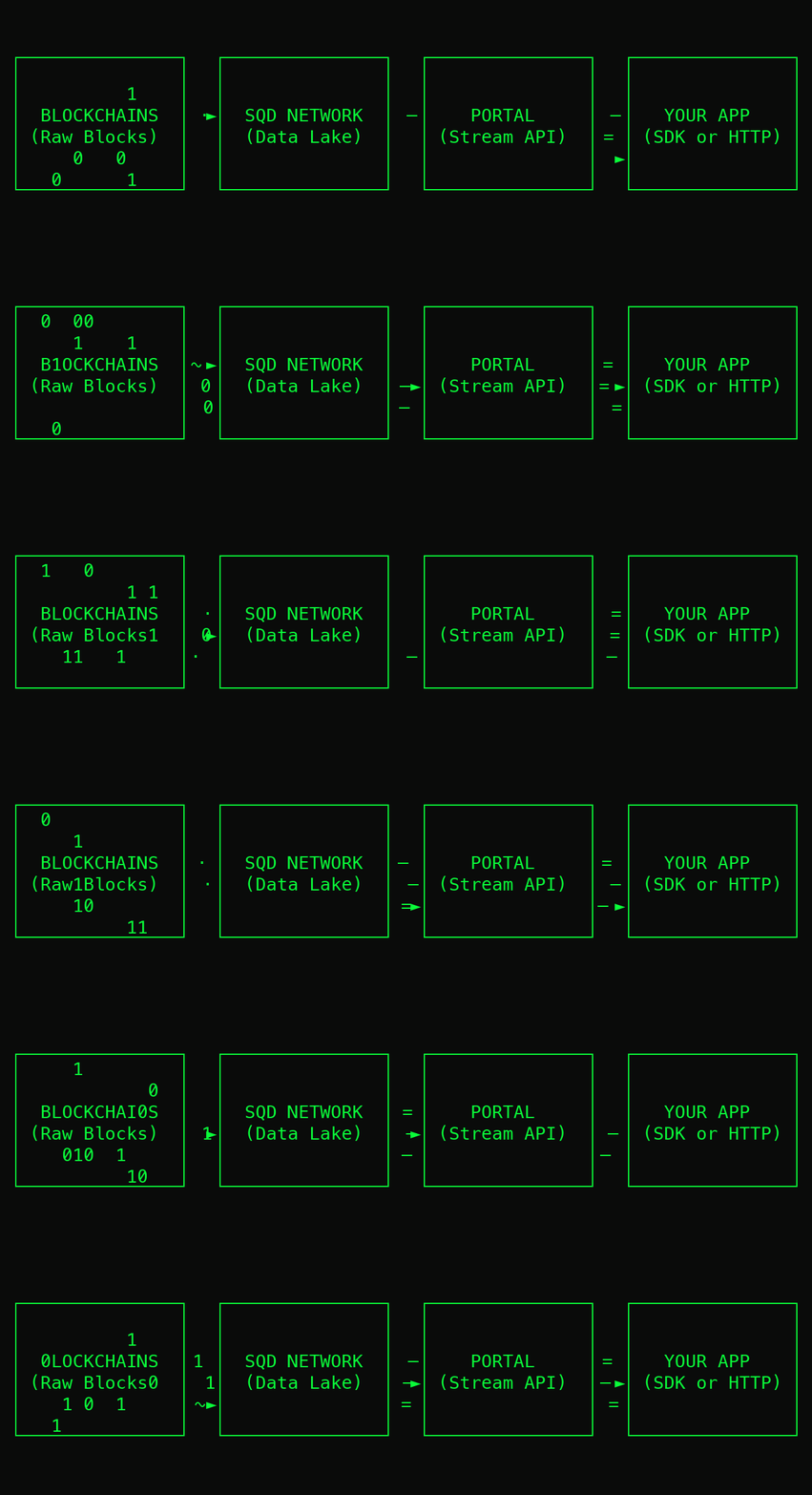
  <img src="https://mintcdn.com/sqd-2119b3c3/jhotoTOdrFNe3s36/images/network-flow.gif?s=68ccb771fb8564bc7eebe286b4a48e57" alt="Animated diagram of raw blocks flowing from blockchains into the SQD Network data lake and streaming through Portal to your application" width="1284" height="394" data-path="images/network-flow.gif" />
</Frame>

The Network stores blockchain data in a distributed data lake, making it available through **SQD Portal**, a high-performance data access interface that fetches data chunks from multiple worker nodes in parallel.

Portal exposes a streaming HTTP API optimized for data extraction at scale. It handles pagination, finality tracking, and reorg compensation automatically, so you can focus on building your application rather than managing infrastructure complexity.

You can access the network in three ways:

1. **Use managed Portal endpoints** - SQD-hosted endpoints provide instant access to 120+ networks with zero setup
2. **Self-host Portal** - Run your own Portal instance alongside your nodes for complete data sovereignty
3. **Use the SDK** - Build production indexers with TypeScript SDKs that abstract Portal's API into a developer-friendly interface

<Tip>
  Learn more about Portal and how it transforms blockchain data access in the
  [Portal overview](/en/portal/overview).
</Tip>

## Understand the Network

The Introduction pages explain how the Network components fit together. The
existing worker, delegation, and Portal pages remain the source for setup and
usage procedures.

<CardGroup cols={2}>
  <Card title="Network components" icon="server" href="/en/network/introduction/network-components">
    See the roles of ingestion services, the scheduler, workers, Portal, and
    contracts.
  </Card>

  <Card title="From blocks to chunks" icon="database" href="/en/network/introduction/blocks-to-chunks">
    Follow finalized data from a source into chunk storage and worker disks.
  </Card>

  <Card title="How a query is served" icon="chart-line" href="/en/network/introduction/how-a-query-is-served">
    Follow one archival request from Portal to workers and back to the client.
  </Card>

  <Card title="How real-time data is served" icon="clock" href="/en/network/introduction/how-real-time-data-is-served">
    See how recent blocks move through HotblocksDB and Portal.
  </Card>

  <Card title="Onchain and offchain" icon="link" href="/en/network/introduction/onchain-and-offchain">
    Separate token and registration records from the data-serving path.
  </Card>
</CardGroup>

## Network Options

The Network operates in two configurations, both freely accessible and using the same Portal API:

<div className="overflow-x-auto my-8">
  <table className="w-full text-sm border-collapse">
    <thead>
      <tr className="border-b-2 border-slate-300 dark:border-slate-600">
        <th className="text-left p-3 font-semibold text-gray-900 dark:text-white">
          Feature
        </th>

        <th className="text-left p-3 font-semibold text-gray-900 dark:text-white">
          Permissionless Network
        </th>

        <th className="text-left p-3 font-semibold text-gray-900 dark:text-white">
          Private Network
        </th>
      </tr>
    </thead>

    <tbody className="text-gray-700 dark:text-gray-400">
      <tr className="border-b border-slate-200 dark:border-slate-700">
        <td className="p-3 font-medium">Status</td>
        <td className="p-3">Mainnet</td>
        <td className="p-3">Production-ready</td>
      </tr>

      <tr className="border-b border-slate-200 dark:border-slate-700">
        <td className="p-3 font-medium">Infrastructure</td>
        <td className="p-3">Fully decentralized</td>
        <td className="p-3">Operated by Subsquid Labs GmbH</td>
      </tr>

      <tr className="border-b border-slate-200 dark:border-slate-700">
        <td className="p-3 font-medium">Participation</td>
        <td className="p-3">Anyone can run workers or delegate</td>
        <td className="p-3">Permissioned</td>
      </tr>

      <tr className="border-b border-slate-200 dark:border-slate-700">
        <td className="p-3 font-medium">Networks supported</td>
        <td className="p-3">Almost all</td>
        <td className="p-3">120+ networks</td>
      </tr>
    </tbody>
  </table>
</div>

<Note>
  Both networks are free to query. See the [complete list of supported
  networks](/en/data/networks/evm) for gateway URLs and network details.
</Note>

## Participate in the Permissionless Network

The decentralized network is now in mainnet. Workers and delegators earn
rewards. Portal operators lock SQD for query capacity. See [Ways to
participate](/en/network/participate) for the requirements and lock periods
side by side.

<CardGroup cols={2}>
  <Card title="Run a Worker Node" icon="server" href="/en/network/worker">
    Contribute storage and compute resources to the network and earn SQD tokens
  </Card>

  <Card title="Delegate SQD Tokens" icon="coins" href="/en/network/delegate">
    Reward high-performing workers and share in their profits
  </Card>

  <Card title="Run a Portal" icon="terminal" href="/en/portal/self-hosting">
    Lock SQD for query capacity and serve your own application
  </Card>

  <Card title="Network App" icon="chart-column" href="/en/network/network-app">
    Check current returns, worker status, and network economics
  </Card>
</CardGroup>

## Get Started with SQD Network

Ready to build on the Network? Choose your path:

<CardGroup cols={3}>
  <Card title="Portal API" icon="plug" href="/en/portal/evm/quickstart">
    Query blockchain data directly via HTTP API
  </Card>

  <Card title="Build with SDK" icon="code" href="/en/sdk/overview">
    Create production indexers with TypeScript SDKs
  </Card>

  <Card title="Browse Networks" icon="globe" href="/en/data/networks/evm">
    View all 120+ supported networks and gateway URLs
  </Card>
</CardGroup>


## Related topics

- [SQD Network Whitepaper](/en/network/whitepaper.md)
- [SQD Network components](/en/network/introduction/network-components.md)
- [SQD Firehose](/en/sdk/alternative-clients/subgraphs-support.md)
- [Tron SQD Network API](/en/sdk/squid-sdk/tron/reference/network-api.md)
- [Network App](/en/network/network-app.md)


This documentation is built and hosted on [Mintlify](https://mintlify.com), a developer documentation platform.